> ## Documentation Index
> Fetch the complete documentation index at: https://discountkit.app/llms.txt
> Use this file to discover all available pages before exploring further.
# Introduction
> Real-time discount data available instantly in your storefront
Discount Kit Live syncs the discounts you choose to your Shopify storefront, making them available through metafields for instant access — no API calls, no performance overhead.
## How It Works
Discount Kit Live is **opt-in**. You decide which discounts the storefront sees by tagging them with `dk:live` in Shopify's discount editor — the same Tags field you use for anything else. This works for both **automatic discounts** and **discount codes** (manual codes), created in Discount Kit or anywhere else in your admin.
* **To include** a discount in Discount Kit Live: add the tag `dk:live`.
* **To exclude** a discount: remove the tag.
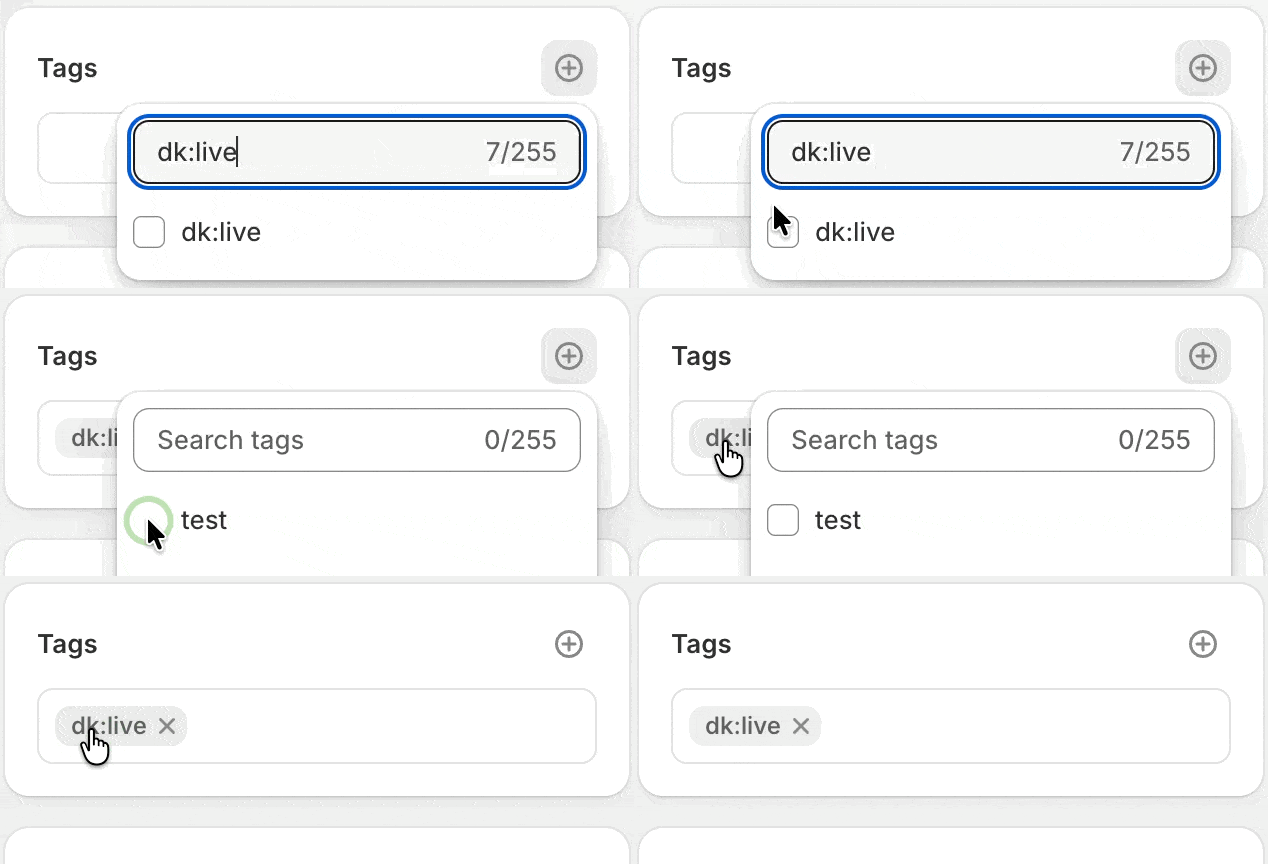 Once a discount is tagged, the **Refresher** syncs it to your storefront within seconds. Discount data is available through metafields at three levels — products, collections, and shop-wide — all using the namespace `app--9549316097--discount_kit` and key `discounts`.
**Migrating from the old behaviour?** When the tag-gated model first goes live for your shop, Discount Kit automatically applies the `dk:live` tag to every currently-active automatic discount, so nothing drops out of your storefront on rollout. After that one-time migration, the tag is yours to manage — add or remove it like any other tag to control what surfaces in Discount Kit Live.
## Discount Limits
Discount Kit Live surfaces **up to 25 tagged discounts in total** on each refresh. That's a hard ceiling combining both automatic and code-based discounts, driven by Shopify's underlying limit on the discount nodes query.
* Shopify allows at most 25 *active automatic* discounts on a shop, so before this PR the 25 cap was effectively invisible.
* With code-based discounts now supported, the cap matters: if you tag 5 automatic + 30 code discounts with `dk:live`, only 25 of them will appear in Discount Kit Live on each refresh. Untag the ones you don't need surfaced.
### Collection Fan-Out
Discounts targeting collections are automatically **fanned out** to every product in those collections. This means a product's metafields include all applicable discounts — both those targeting the product directly and those inherited from its collections.
For example, if you create a "Summer Sale" discount on the "T-Shirts" collection, every product in that collection will have the discount in its `discounts` metafield. You don't need to check the collection metafield separately — product badges just work.
The same applies to `max_reward_percent`, `max_reward_cents`, and `max_reward_discount` — these scalar metafields reflect the best discount across both direct and collection-inherited discounts.
## Key Features
* **Merchant-controlled** — opt in or out per discount via the `dk:live` tag
* **Automatic + code discounts** — surface both auto-applied and code-redeemed discounts
* **No API calls** — data is already on the page via metafields
* **Real-time updates** — changes sync within seconds of tag/untag
* **Zero latency** — instant access, even on collection pages with 100+ products
* **Server-rendered** — available during initial page render
* **Active discounts only** — expired or paused discounts are excluded
* **Quick access values** — scalar metafields for the best discount (`max_reward_percent`, `max_reward_cents`)
## Limitations and Restrictions
While Discount Kit Live provides powerful storefront access to discount data, there are some known limitations:
**Scalar metafields only reflect universal discounts:**
The `max_reward_percent`, `max_reward_cents`, and `max_reward_discount` scalar metafields only reflect discounts that apply to **all visitors** without conditions. The following discount types are excluded from scalar computation:
* **Test mode** discounts
* **GWP** (Gift With Purchase) discounts
* **Customer-tagged** discounts (targeting specific customer tags)
* **Market-specific** discounts (targeting specific markets)
* **Code-based** discounts (require the shopper to enter a code; advertising them in a "Save up to X%" badge would over-promise to shoppers who don't know the code)
These discounts still appear in the full `discounts` array, where you can filter them in Liquid. Use the scalar metafields for simple, drop-in badges that work for all visitors.
**Collection fan-out product limit:**
When discounts target collections, Discount Kit Live resolves every product in those collections and writes metafields to each one. This fan-out is currently limited to a maximum of **8,000 unique products** across all collection-based discounts. Products beyond this limit will still receive the correct discount at checkout, but may not display badges or strike-through pricing on the storefront. This limit will be increased in a future update.
**Customer Segments:**
Shopify's native automatic discounts support targeting by **customer segments** (dynamically updated customer groups based on behavior, purchase history, etc.). Unfortunately, Shopify does not currently expose customer segment information in Liquid templates.
This means:
* Discounts using customer segments will work correctly at checkout
* However, Discount Kit Live cannot filter these discounts in the storefront based on segment membership
* Workaround: Use **customer tags** instead, which are supported in Liquid and work with Discount Kit Live
If you need to show segment-specific discounts in your storefront, consider using customer tags as an alternative targeting method.
## Getting Started
Control what LIVE syncs to your storefront
Learn how to access discount data in your theme
Copy-paste code for badges, pricing, and banners
Complete field reference documentation
Filter discounts by method, market, customer tags, or applied codes
Once a discount is tagged, the **Refresher** syncs it to your storefront within seconds. Discount data is available through metafields at three levels — products, collections, and shop-wide — all using the namespace `app--9549316097--discount_kit` and key `discounts`.
**Migrating from the old behaviour?** When the tag-gated model first goes live for your shop, Discount Kit automatically applies the `dk:live` tag to every currently-active automatic discount, so nothing drops out of your storefront on rollout. After that one-time migration, the tag is yours to manage — add or remove it like any other tag to control what surfaces in Discount Kit Live.
## Discount Limits
Discount Kit Live surfaces **up to 25 tagged discounts in total** on each refresh. That's a hard ceiling combining both automatic and code-based discounts, driven by Shopify's underlying limit on the discount nodes query.
* Shopify allows at most 25 *active automatic* discounts on a shop, so before this PR the 25 cap was effectively invisible.
* With code-based discounts now supported, the cap matters: if you tag 5 automatic + 30 code discounts with `dk:live`, only 25 of them will appear in Discount Kit Live on each refresh. Untag the ones you don't need surfaced.
### Collection Fan-Out
Discounts targeting collections are automatically **fanned out** to every product in those collections. This means a product's metafields include all applicable discounts — both those targeting the product directly and those inherited from its collections.
For example, if you create a "Summer Sale" discount on the "T-Shirts" collection, every product in that collection will have the discount in its `discounts` metafield. You don't need to check the collection metafield separately — product badges just work.
The same applies to `max_reward_percent`, `max_reward_cents`, and `max_reward_discount` — these scalar metafields reflect the best discount across both direct and collection-inherited discounts.
## Key Features
* **Merchant-controlled** — opt in or out per discount via the `dk:live` tag
* **Automatic + code discounts** — surface both auto-applied and code-redeemed discounts
* **No API calls** — data is already on the page via metafields
* **Real-time updates** — changes sync within seconds of tag/untag
* **Zero latency** — instant access, even on collection pages with 100+ products
* **Server-rendered** — available during initial page render
* **Active discounts only** — expired or paused discounts are excluded
* **Quick access values** — scalar metafields for the best discount (`max_reward_percent`, `max_reward_cents`)
## Limitations and Restrictions
While Discount Kit Live provides powerful storefront access to discount data, there are some known limitations:
**Scalar metafields only reflect universal discounts:**
The `max_reward_percent`, `max_reward_cents`, and `max_reward_discount` scalar metafields only reflect discounts that apply to **all visitors** without conditions. The following discount types are excluded from scalar computation:
* **Test mode** discounts
* **GWP** (Gift With Purchase) discounts
* **Customer-tagged** discounts (targeting specific customer tags)
* **Market-specific** discounts (targeting specific markets)
* **Code-based** discounts (require the shopper to enter a code; advertising them in a "Save up to X%" badge would over-promise to shoppers who don't know the code)
These discounts still appear in the full `discounts` array, where you can filter them in Liquid. Use the scalar metafields for simple, drop-in badges that work for all visitors.
**Collection fan-out product limit:**
When discounts target collections, Discount Kit Live resolves every product in those collections and writes metafields to each one. This fan-out is currently limited to a maximum of **8,000 unique products** across all collection-based discounts. Products beyond this limit will still receive the correct discount at checkout, but may not display badges or strike-through pricing on the storefront. This limit will be increased in a future update.
**Customer Segments:**
Shopify's native automatic discounts support targeting by **customer segments** (dynamically updated customer groups based on behavior, purchase history, etc.). Unfortunately, Shopify does not currently expose customer segment information in Liquid templates.
This means:
* Discounts using customer segments will work correctly at checkout
* However, Discount Kit Live cannot filter these discounts in the storefront based on segment membership
* Workaround: Use **customer tags** instead, which are supported in Liquid and work with Discount Kit Live
If you need to show segment-specific discounts in your storefront, consider using customer tags as an alternative targeting method.
## Getting Started
Control what LIVE syncs to your storefront
Learn how to access discount data in your theme
Copy-paste code for badges, pricing, and banners
Complete field reference documentation
Filter discounts by method, market, customer tags, or applied codes